

A deployment strategy is the method you use to replace the running version of an application with a new one. It decides how much downtime users see, how many people are exposed to a bad release, and how fast you can roll back when something breaks.
The code you ship is the same either way. What changes is the risk. A team that deploys everything at once at 5 p.m. on a Friday and a team that sends 5% of traffic to the new version first are shipping the same code with very different odds of a bad weekend.
This guide covers the seven deployment strategies that matter in practice: recreate, rolling, blue-green, canary, A/B testing, shadow and feature flags. For each one you get how it works, when to use it and what it costs. At the end there is a decision guide and working Kubernetes examples.
Deployment strategies at a glance
| Strategy | Downtime | Rollback speed | Extra infrastructure | Complexity | Best for |
|---|---|---|---|---|---|
| Recreate | Yes | Slow (redeploy) | None | Low | Dev/test, apps that can’t run two versions at once |
| Rolling | No | Medium (roll back step by step) | Little (a few extra instances) | Low | Most stateless web apps and APIs |
| Blue-green | No | Instant (switch traffic back) | 2x during release | Medium | Critical apps that need instant rollback |
| Canary | No | Fast (stop the canary) | Small | High | High-traffic services where you want real-user validation |
| A/B testing | No | Fast | Small | High | Comparing features by business metrics |
| Shadow | No | Not needed (users never see it) | Up to 2x | Very high | Testing performance or rewrites with real traffic |
| Feature flags | No | Instant (flip the flag) | None | Medium | Separating deploy from release, gradual rollouts |
1. Recreate deployment
A recreate deployment stops every instance of the old version, then starts the new version. It’s the simplest strategy there is, and also the only one on this list with planned downtime.
How it works:
- Shut down all instances of version 1.
- Start all instances of version 2.
- Send traffic once the new instances are healthy.
Pros: easy to understand, no extra infrastructure, and only one version ever runs at a time. That last point matters for apps that break when two versions share a database or a queue.
Cons: users see downtime for as long as shutdown plus startup takes. Rolling back means doing the whole process again in reverse.
Use it for: development and test environments, internal tools with a maintenance window, and apps whose data migrations can’t support two versions running side by side.
2. Rolling deployment
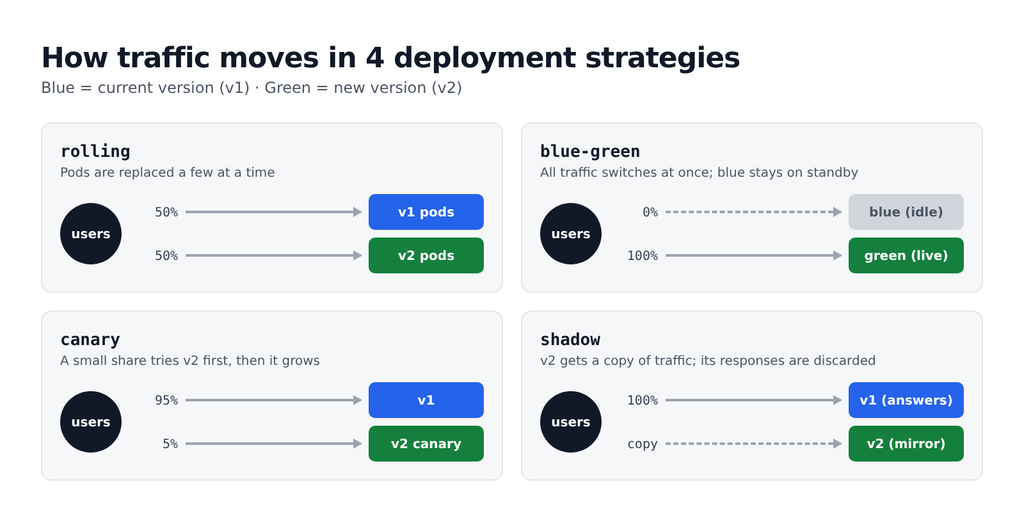
A rolling deployment replaces instances of the old version with the new version a few at a time, until every instance runs the new code. It’s the default in Kubernetes and in most managed platforms, which is why so many teams use it without ever choosing it.
How it works:
- Start one or more new instances and wait until they pass health checks.
- Remove the same number of old instances.
- Repeat until no old instances are left.
Two settings control the pace: how many extra instances can run above the desired count (in Kubernetes, maxSurge) and how many can be unavailable during the update (maxUnavailable).
Pros: no downtime, little extra capacity, and it’s built into almost every orchestrator.
Cons: for a while, both versions serve traffic at the same time, so your API and database schema must be backward compatible. Rollback is another rolling update, so it’s not instant. And if the bug only appears under load, it may reach every user before you notice.
Use it for: most stateless web apps, APIs and microservices, especially when you have good health checks.
3. Blue-green deployment
A blue-green deployment runs two identical production environments. “Blue” serves all live traffic, while “green” gets the new version. Once green passes its checks, you switch all traffic to it in one step, and blue stays on standby as an instant rollback.
How it works:
- Blue runs version 1 and receives 100% of traffic.
- Deploy version 2 to green and test it there, with no users on it yet.
- Switch the router, load balancer or DNS from blue to green.
- Keep blue running for a while. If something breaks, switch back.
- Once you’re confident, blue becomes the target for the next release.
Pros: zero downtime, a full test of the new version in a production-identical environment, and rollback that takes seconds. Users only ever see one version at a time.
Cons: you pay for double capacity during each release. The database is the hard part: both environments usually share it, so schema changes must work with both versions. The common fix is the expand-and-contract pattern: add new columns first, deploy, then remove old ones in a later release. Long-running connections and in-flight jobs also need care at the moment of the switch.
Use it for: customer-facing apps where downtime is expensive and you want the fastest possible rollback. It’s also a good fit for small teams, because the idea is simple even if the infrastructure isn’t. In Kubernetes, a blue-green deployment is usually two Deployments behind one Service, with the Service selector switched from one to the other.
4. Canary deployment
A canary deployment releases the new version to a small share of users first, watches how it behaves, and only then expands it to everyone. The name comes from the canaries miners once carried to detect gas: if the canary has a problem, you find out before everyone else does.
How it works:
- Deploy version 2 next to version 1.
- Send a small slice of traffic to version 2, for example 5%.
- Compare error rate, latency and key business metrics between the two versions.
- If they look healthy, raise the share in steps (5% → 25% → 50% → 100%). If not, send all traffic back to version 1.
The comparison step is what makes canaries work. Without clear metrics and thresholds, a canary is just a slow rolling update. Tools like Argo Rollouts and Flagger can run the analysis and promote or abort automatically.
Pros: a bad release only hits a small share of users, you test with real production traffic, and rollback is fast. You also need far less extra capacity than with blue-green.
Cons: it’s one of the more demanding strategies to run well. You need traffic splitting (a service mesh, a smart ingress or a load balancer that supports weights), good observability and enough traffic for the metrics to mean something. Like rolling updates, two versions run at once, so backward compatibility is required.
Use it for: high-traffic services where a bug would be costly, and for teams with solid monitoring. Canary vs blue-green comes down to this: blue-green gives you the fastest rollback, canary gives you the smallest blast radius.
5. A/B testing
A/B testing looks like a canary on the surface, since two versions run at once and each gets part of the traffic. The difference is the goal. A canary asks “is the new version safe?”, while an A/B test asks “which version performs better for the business?”
How it works:
- Run version A and version B side by side.
- Route users by a rule instead of a random percentage: a cookie, a user ID, a country, a device type.
- Keep each user on the same version so the experience is consistent.
- Compare conversion, engagement or revenue, then keep the winner.
Pros: decisions based on real user behavior instead of opinions.
Cons: you need sticky routing, an analytics setup and enough traffic for statistically meaningful results. A/B tests usually run for days or weeks, much longer than a deployment.
Use it for: product and UX changes, such as a new checkout flow, pricing page or onboarding. In practice, most teams run A/B tests with feature flags or an experimentation platform rather than as a separate infrastructure deployment.
6. Shadow deployment
A shadow deployment (also called traffic mirroring or a dark deployment) sends a copy of real production traffic to the new version, but throws away its responses. Users only ever get answers from the current version, so they can’t be affected by bugs in the new one.
How it works:
- Deploy version 2 next to version 1.
- Configure a proxy or service mesh to mirror incoming requests to version 2.
- Compare version 2’s responses, latency and resource use against version 1.
- When the results match, release version 2 with one of the other strategies.
Pros: the most realistic test possible, with zero user impact. It’s excellent for performance testing and for validating a rewrite, such as moving a service to a new language or database.
Cons: it can double the load on your infrastructure. The big trap is side effects: if the shadow version writes to a database, charges a card or sends an email, it does so for real. Shadow services need to run against stubbed or isolated dependencies for anything that changes state.
Use it for: read-heavy services, major rewrites and performance-critical changes, where you want proof under real load before any user sees the new code.
7. Feature flags (dark launches)
Feature flags separate two things most teams treat as one: deploying code and releasing a feature. You ship the new code to production turned off, then switch it on for specific users, a percentage of traffic or everyone, without another deployment.
How it works:
- Wrap the new feature in a flag check in your code.
- Deploy as usual, with the flag off. Nothing changes for users.
- Turn the flag on for internal users, then a small percentage, then everyone.
- If something goes wrong, turn the flag off. The fix takes seconds and needs no rollback.
- Once the feature is stable, remove the flag from the code.
if (flags.isEnabled('new-checkout', { userId: user.id })) {
  return renderNewCheckout(cart);
}
return renderCheckout(cart);
Pros: instant “rollback” for a single feature, gradual rollouts without traffic-splitting infrastructure, and the ability to merge unfinished work into the main branch safely. Flags also power A/B tests.
Cons: every flag is a new code path to test. Old flags that nobody removes pile up as technical debt, so treat flag cleanup as part of the feature. Flags also don’t help with infrastructure changes, like a new database version or a config change.
Use it for: almost any team that deploys often. Feature flags work well on top of rolling or blue-green deployments: the deployment strategy protects the infrastructure, and the flags protect the features. OpenFeature is a vendor-neutral, CNCF-hosted standard for flag APIs if you want to avoid lock-in.
How to choose the right deployment strategy
There is no single best deployment strategy. Work through these questions in order and stop at the first clear answer:
- Can your app run two versions at the same time? If a schema change or a shared queue makes that impossible, use recreate for this release, or redesign the change with expand-and-contract so you can use something safer next time.
- Is a short outage acceptable? For dev, test and internal tools, recreate or a basic rolling update is enough.
- Do you need instant rollback and can afford double capacity for an hour? Choose blue-green.
- Do you have lots of traffic and good metrics, and want to limit how many users a bad release can hit? Choose canary.
- Are you replacing a critical service or worried about performance? Run a shadow deployment first, then release with canary or blue-green.
- Is the risk in a feature rather than the infrastructure? Ship it behind a feature flag, on top of whatever strategy you already use.
- Are you trying to learn which version users prefer? That’s an A/B test, not a deployment decision.
A practical path for most teams: start with rolling updates and solid health checks, add feature flags next, and move critical services to canary once your monitoring can tell a healthy release from a bad one.
Whatever you pick, the strategy only works if your rollback works. Test it on purpose, not for the first time during an incident.
Deployment strategies in Kubernetes
A Kubernetes Deployment supports exactly two strategy types: RollingUpdate (the default) and Recreate. Blue-green and canary are not built in, but you can build them from standard objects or with a progressive delivery tool like Argo Rollouts or Flagger.
Rolling update (built in)
Both maxSurge and maxUnavailable default to 25%. For a cautious, zero-downtime rollout, allow one extra Pod and never drop below the desired count. A readiness probe is essential, because Kubernetes only moves on once new Pods report ready.
apiVersion: apps/v1
kind: Deployment
metadata:
  name: myapp
spec:
  replicas: 4
  strategy:
    type: RollingUpdate
    rollingUpdate:
      maxSurge: 1
      maxUnavailable: 0
  selector:
    matchLabels:
      app: myapp
  template:
    metadata:
      labels:
        app: myapp
    spec:
      containers:
        - name: myapp
          image: registry.example.com/myapp:2.0.0
          readinessProbe:
            httpGet:
              path: /healthz
              port: 8080
            periodSeconds: 5
To roll back, run kubectl rollout undo deployment/myapp.
Recreate (built in)
Change the strategy block to type: Recreate. Kubernetes terminates all old Pods before creating new ones.
Blue-green with two Deployments and one Service
Run myapp-blue and myapp-green as two Deployments, each with a version label. The Service selects one of them:
apiVersion: v1
kind: Service
metadata:
  name: myapp
spec:
  selector:
    app: myapp
    version: blue
  ports:
    - port: 80
      targetPort: 8080
When green is ready, switch all traffic in one command, and switch back the same way if needed:
kubectl patch service myapp \
  -p '{"spec":{"selector":{"app":"myapp","version":"green"}}}'
Canary with Argo Rollouts
Argo Rollouts adds a Rollout resource that replaces the Deployment and understands canary steps. This one sends 5% of traffic to the new version, waits, increases to 25% and 50%, then waits for a manual promotion:
apiVersion: argoproj.io/v1alpha1
kind: Rollout
metadata:
  name: myapp
spec:
  replicas: 10
  selector:
    matchLabels:
      app: myapp
  template:
    metadata:
      labels:
        app: myapp
    spec:
      containers:
        - name: myapp
          image: registry.example.com/myapp:2.0.0
  strategy:
    canary:
      steps:
        - setWeight: 5
        - pause: { duration: 10m }
        - setWeight: 25
        - pause: { duration: 10m }
        - setWeight: 50
        - pause: {}
A pause with no duration waits until you run kubectl argo rollouts promote myapp. Without a service mesh or ingress integration, Argo Rollouts approximates the weights by changing replica counts. With one configured, it splits traffic precisely, and you can add an analysis step that checks Prometheus metrics and aborts automatically.
FAQ
What is a deployment strategy?
A deployment strategy is the method used to replace a running version of software with a new one. It determines whether users see downtime, how many users are exposed to a new release at first, and how quickly you can roll back.
What are the top 5 deployment strategies?
The five most widely used are rolling, blue-green, canary, recreate and feature flags. A/B testing and shadow deployments are common in larger organizations for experiments and for testing with real traffic.
What are the two types of deployment strategies in Kubernetes?
A Kubernetes Deployment supports two strategy types: RollingUpdate, which is the default, and Recreate. Blue-green and canary need extra setup, such as two Deployments behind one Service or a tool like Argo Rollouts or Flagger.
Is blue-green deployment limited to Kubernetes?
No. Blue-green works anywhere you can run two environments and switch traffic between them: virtual machines behind a load balancer, two Nginx upstreams, DNS records, or managed platforms like AWS Elastic Beanstalk and Azure App Service deployment slots.
In a blue-green deployment, which environment is live?
Whichever one the router currently points to. Blue and green are just names, and they swap roles with every release: after you switch to green, green is live and blue becomes the standby and the target for the next release.
What is the difference between canary and blue-green deployment?
Blue-green switches all traffic to the new version at once and keeps the old one ready for instant rollback. Canary moves traffic gradually, starting with a small share of users, so a bad release affects fewer people. Blue-green needs more capacity; canary needs better traffic routing and monitoring.
What is the safest deployment strategy?
For most teams, a canary deployment with automated metric checks, combined with feature flags, gives the smallest blast radius. The safest strategy is still the one your team can roll back reliably, so practice rollbacks before you need them.
Sources
- Deployments (Kubernetes documentation): strategy types and
maxSurge/maxUnavailabledefaults - Canary Deployment Strategy (Argo Rollouts documentation): Rollout resource, steps and manual promotion